
Digital Marketing
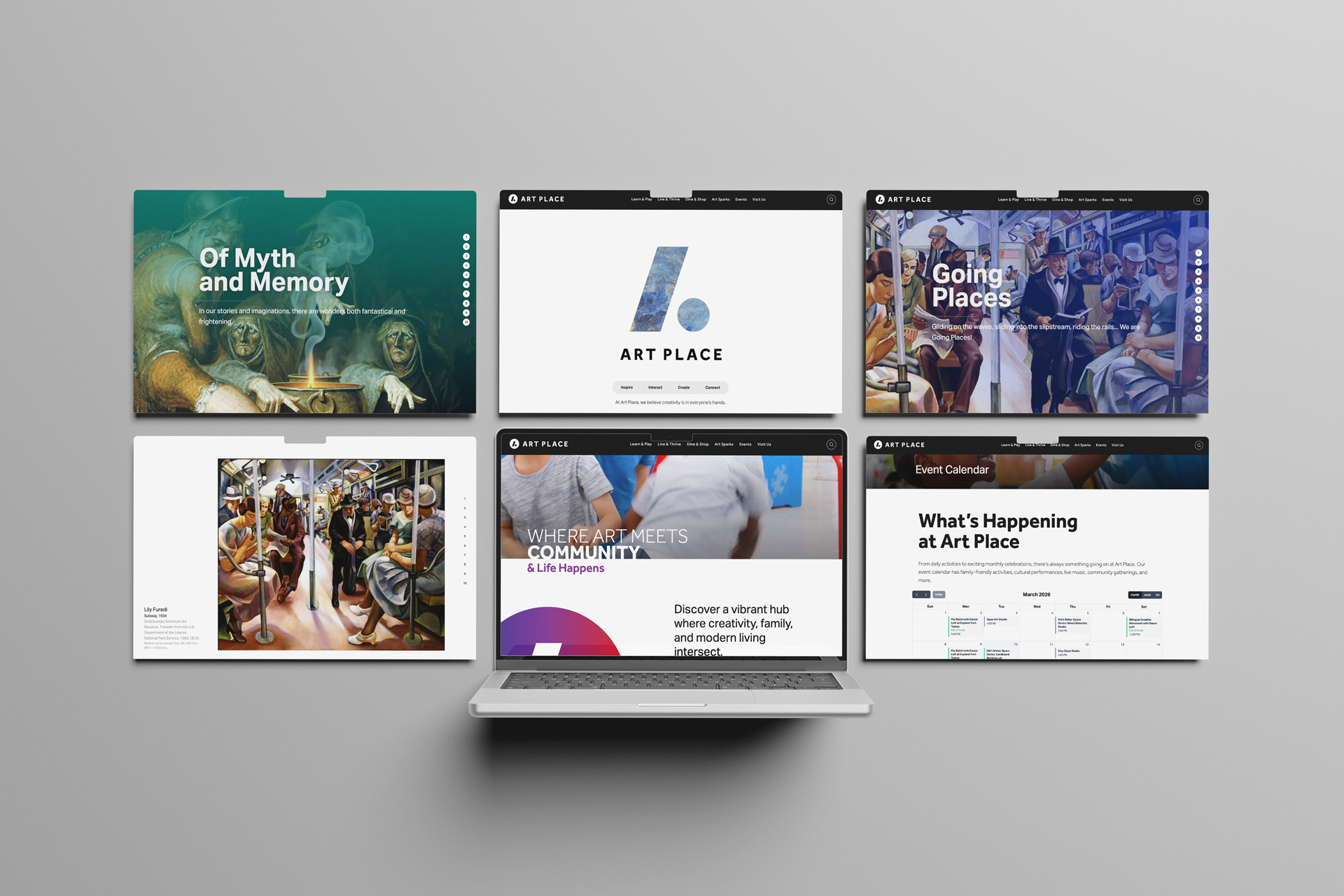
We developed an AI-powered event calendar system for Webflow that enables client-managed recurring events through CMS-driven logic and FullCalendar integration, eliminating external dependencies while delivering enterprise-level event management functionality.
AI-Powered Event Calendar for Webflow: A Client-Managed, Recurring Event System
We've developed a powerful solution for organizations that need comprehensive event management but want to maintain control within their familiar Webflow CMS environment. Our AI-powered event calendar system combines the flexibility of Webflow CMS with the sophisticated scheduling capabilities of FullCalendar to create an interactive event calendar that handles complex recurring schedules while remaining completely client-manageable.
The Challenge: Complex Event Management Without External Dependencies
Many organizations struggle with event calendar solutions that force them to choose between functionality and simplicity. External event platforms often create sync issues, while basic calendar widgets lack the recurring events system capabilities needed for sophisticated programming schedules. Our approach eliminates these compromises by using a DOM-based architecture where all event data lives directly in Webflow CMS integrations.
This no-API web architecture means no external dependencies, no sync failures, and no additional platforms for staff to learn. Everything happens within the Webflow ecosystem your team already knows.
Core Features of Our Event Management Platform
Our event management platform delivers enterprise-level functionality through an elegant, client-friendly interface:
- Client-Managed Events: Create and edit all events directly in Webflow CMS without external tools
- Advanced Recurring Support: Handle weekly, bi-weekly, monthly, and annual events using RRULE scheduling
- Interactive Calendar Views: Multiple viewing options including month, week, and list formats through FullCalendar integration
- SEO-Optimized Event Pages: Each event generates native Webflow pages for maximum search visibility
- Categorization System: Organize events by type with custom color coding and filtering
Technical Architecture: DOM-Based Simplicity
Our system works by rendering Webflow CMS data directly on the page, where FullCalendar reads it to populate the calendar UI development. This approach eliminates complex API integrations while providing all the functionality of enterprise event management systems.
The Webflow automation handles recurring event generation automatically, expanding simple CMS entries into full calendar displays without requiring manual intervention. For example, a single "Weekly Yoga" entry becomes 52 individual calendar events with proper dates, times, and metadata.
Scalable for Every Organization Type
We've implemented this system across various organization types, each with unique requirements:
- Mixed-use developments: Managing resident programming alongside retail events
- Cultural institutions: Complex performance schedules with varying recurrence patterns
- Community centers: Diverse programming requiring flexible categorization
- Corporate campuses: Internal events with access control and branding requirements
Optional Automation for Large-Scale Implementation
For organizations with extensive event schedules, we offer optional AI workflow development using n8n to handle bulk imports from existing systems like Airtable. This is particularly valuable for:
- Initial calendar setup from legacy systems
- Seasonal programming imports
- Integration with external booking platforms
- Automated event template creation
Once imported, Webflow becomes the single source of truth, maintaining the simplicity of our client-managed approach.
Real-World Applications
This calendar framework excels for organizations hosting regular public programming. Community event calendar implementations have proven particularly successful for:
- Retail and lifestyle centers managing tenant programming
- Residential developments with amenity scheduling
- Cultural venues with complex performance calendars
- Public spaces requiring event coordination

Design Philosophy: Simplicity Without Compromise
Our approach prioritizes five core principles that ensure long-term success:
- Client Simplicity: All event management happens within familiar Webflow interface
- Minimal Infrastructure: No external APIs, sync services, or third-party dependencies
- Reusable Framework: Rapid deployment across multiple client sites with consistent functionality
- SEO Performance: Native Webflow pages ensure maximum search engine visibility
- Brand Flexibility: Complete customization to match client brand requirements

Technical Benefits for Developers
The Webflow custom code implementation provides several advantages for technical teams:
- Predictable performance without external API dependencies
- Simple debugging through standard Webflow development tools
- Easy customization using familiar HTML, CSS, and JavaScript
- Scalable architecture supporting hundreds of events
- Built-in version control through Webflow's publishing system

Implementation Process
Deploying our interactive event calendar system typically involves these key steps:
- CMS Structure Setup: Configure Webflow collections for events, categories, and recurrence rules
- Calendar Integration: Implement FullCalendar with custom styling and functionality
- Recurring Logic Implementation: Deploy RRULE parsing and event generation system
- UI Customization: Brand the calendar interface to match client specifications
- Content Migration: Transfer existing events and establish ongoing workflow

Ongoing Management Benefits
Once implemented, the system requires minimal technical maintenance while providing maximum flexibility:
- Marketing teams can manage events without developer support
- Changes appear immediately without sync delays
- Event pages automatically optimize for search engines
- Categories and styling adapt to evolving brand requirements
- System scales naturally with organizational growth
Results: Lightweight Power
The combination of Webflow CMS simplicity with advanced scheduling capabilities creates a unique solution in the event management space. Our clients report significant time savings in event management while gaining sophisticated functionality that rivals enterprise platforms.
This system transforms event management from a technical challenge into a content management workflow, enabling organizations to focus on programming rather than platform management. The result is better event promotion, improved attendee experience, and reduced administrative overhead.
For organizations seeking powerful event management without platform complexity, our AI-powered calendar system delivers enterprise functionality through the elegance of Webflow CMS.
Recent Insights
Tags
No items found.
You have a story to tell, an experience to create, an audience to reach. We have the tools, the talent, and the expertise to help. Let’s work together.
Need more industry jargon?
Here are some other related terms in the design, branding, web development, film production and visualization world that may resonate with you.